Pass the Remote! FAQ
Quick answers about playing, buying, devices and privacy. Still stuck? Contact support.
Playing
What is Pass the Remote!?
Pass the Remote! is an 11-game party pack for Apple TV played with a single Siri Remote, with no phones or controllers needed. Everyone plays by passing that one remote around the room.
Do I need phones or game controllers?
No. Pass the Remote! uses only the Siri Remote that came with your Apple TV. One person plays, then hands the remote to the next. Nobody downloads an app, signs in or joins on a phone.
How many people can play?
Play solo, or pick 2, 3 or 4 colors. Each color can be one player or a whole team, so a bigger group splits into up to four color teams and passes the remote between them. Solo play includes 8 of the 11 games.
Can we use our names instead of colors?
Yes. Give each color a name of up to 10 characters and one of 16 silly avatars, like pizza, ninja, unicorn or wizard, and the games cheer for SARAH instead of RED. One toggle on the home screen switches between color names and your names.
What are the 11 games?
Stack It, Memory, Charades & More, Trivia Battle, Elf Archer, Press Swipe Play, Read the Room, Flap Shot, Hangman, Safecracker and Splat!. Every game is played by passing one Siri Remote, and every game is free to play with a starter lineup. See all the games
How does Trivia Battle work?
Pick one of 27 categories and answer multiple-choice questions on the TV, passing the remote between colors. A right answer is worth 3 points, and every answer shows a fun fact. Each color gets one Skip (banks 3 points), one 50/50 and one Double Down per game. How Trivia Battle works
Buying
Is it free? What does Unlock Everything include?
Yes, it's free to download, and every game is free to play with a starter lineup. One optional $9.99 purchase, Unlock Everything, opens every locked deck, category, scene, set, court, level and item: 108 more options today. There are no ads and no subscriptions.
Does Unlock Everything include future games and packs?
Yes. Unlock Everything is a one-time purchase that also opens everything we add later. Splat!'s Whole Mess pack and the Guess the Era trivia category, both added in version 1.6, are already part of it.
Does it work with Family Sharing?
Yes. Unlock Everything supports Family Sharing, so everyone in your Family Sharing group gets it. If Ask to Buy is on, the purchase waits for a parent's approval.
Devices
Which Apple TV do I need?
An Apple TV that runs tvOS 18.0 or later, plus its Siri Remote. You install Pass the Remote! from the App Store on the Apple TV itself.
Does it work with the older Siri Remote?
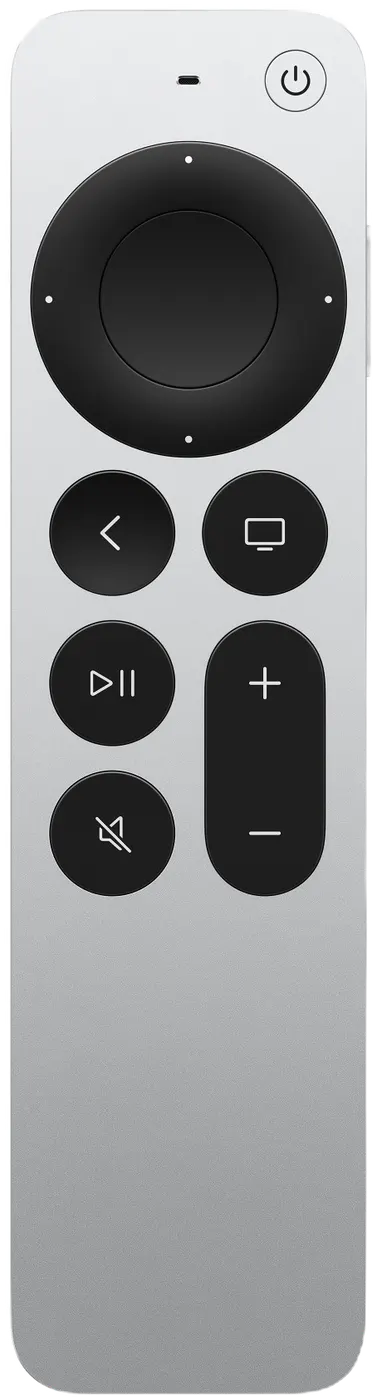
Yes. Pass the Remote! works with both Siri Remote designs: the current aluminum remote and the original black one with the glass touch surface. On the current remote, the Back button does the job of the original remote's MENU button. Setup and controls
Can I play on iPhone, iPad, Fire TV or Roku?
No. Pass the Remote! is made for Apple TV only. It isn't available on iPhone, iPad, Mac, Fire TV, Roku, Android TV or smart TV apps. You can read about it on your phone, but you install and play it on the Apple TV.
How do I install it?
On your Apple TV, open the App Store, search “Pass the Remote” and select Get. It's free to download, and it installs on the Apple TV, not on your phone. Setup and controls
Privacy and age
What age is it for?
Pass the Remote! is rated 9+ on the App Store, for infrequent cartoon or fantasy violence. Families play it together, with grown-ups and kids on the same color teams.
Does it collect any data?
No. The App Store privacy label is Data Not Collected. There are no accounts, no ads, no analytics and no tracking in the app. Custom names and high scores stay on your Apple TV. Read the privacy policy
What languages does it support?
English. All the games, trivia questions, decks and on-screen instructions are in English.
About
Is it good for classrooms?
It's built for a room sharing one screen: one remote, up to four color teams, no student devices or accounts, and a Data Not Collected privacy label. In Hangman, the teacher can enter their own words. Classroom and indoor recess ideas
How is it different from Jackbox?
Pass the Remote! needs only the Siri Remote, passed around the room, so nobody needs a phone to play. Pass the Remote! vs Jackbox
Who makes Pass the Remote!?
Moosheen Studios, LLC, an independent game studio in Houston, Texas, founded by developer David Anderson. The App Store lists the seller as David Anderson.
Free to play · Apple TV only
Get it on your Apple TV
- On your Apple TV, open the App Store.
- Search Pass the Remote
- Select Get. That's it: grab the remote and play.
- tvOS 18.0 or later
- Apple TV only: not available on iPhone, iPad or other TVs
- Free to play, with one optional $9.99 Unlock Everything